Guide · Unreal Engine 5.6 or later
How to make a MetaHuman of yourself from a photo.
This guide takes you from a selfie to a MetaHuman of yourself in Unreal Engine: the photos to take, the head FaceNinja makes from them, and the steps in MetaHuman Creator that keep your own skin, your hair colour and your neck.
Published
What you need
- A sharp, front-facing photo of yourself, in colour. A profile and a three-quarter view help.
- A FaceNinja account; creating one is free.
- Unreal Engine 5.6 or later with MetaHuman, and a free Epic Games account.
- About 10–20 minutes for the head to be made, then a few minutes in MetaHuman Creator.
Not ready to make your own head? Download a sample head free and follow the same steps with it.
From a selfie to MetaHuman Creator, in nine steps
Take the photos
Face the camera in even light, with your eyes open and nothing over your face. One photo is enough. If you can, add a profile and a three-quarter view, all from the same day. A smile, glasses or a beard are fine: the head comes out with a relaxed face, mouth closed and eyes open.
Make your head
Create an account, open the web app, upload the photos and confirm that they are of you. The head is usually ready in 10–20 minutes, because each head is built carefully. You can also start it from your AI agent or from the API.
Download the MetaHuman ZIP
On the head's page, download the MetaHuman ZIP. This is what is inside, from the ZIP's own README:
Inside the MetaHuman ZIP File What it is Import as head.fbxThe head mesh on MetaHuman topology (24,049 vertices), in centimetres, Y-up, life size Static mesh, uniform scale 1, vertex order kept texture/Head_Color.pngSkin base colour, 4K sRGB texture/Head_Normal.pngNormal map, DirectX convention (green down), 4K Normal map, sRGB off texture/Head_Cavity.pngCavity: white is flat, dark is pores and creases, 4K Linear or masks, sRGB off texture/Head_SRMF.pngSpecular level, roughness, metallic and cavity in one map, linear, 4K Masks, sRGB off groom/groom.md, groom/groom.json, groom/groom_sheet.jpgThe hair, brow, lash and beard grooms to pick, and their colours Read Import
head.fbxinto UnrealUnzip. In the Content Browser, import
head.fbxwithout auto-generated collision and without combining meshes, at uniform scale 1, so the vertex order stays exactly as it is.Conform a MetaHuman to it
Create a MetaHuman Character asset, open it in MetaHuman Creator and conform it to the imported head. The head is already on MetaHuman topology, so every vertex stays where FaceNinja put it.
Override the skin
In Skin, turn Texture Override on and set the face's base colour to
Head_Color, the normal toHead_Normaland the cavity toHead_Cavity. These maps carry your freckles, moles, skin tone and wrinkle relief. Without the override, MetaHuman picks one of its library skins and all of that is lost.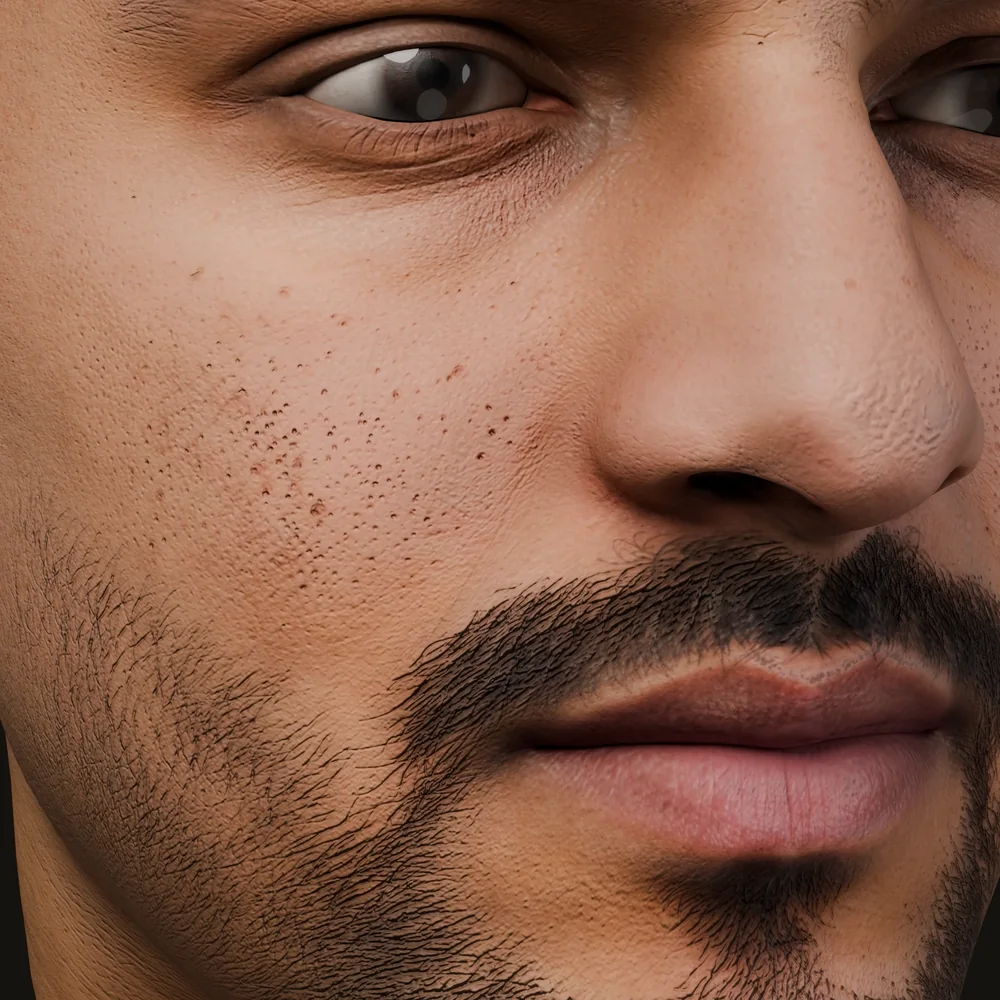
The skin of sample S-16, a synthetic person, rendered from the 4K maps that go into the override. Pick the grooms
Open the Hair tab. For head hair, eyebrows, eyelashes, moustache, beard and peach fuzz, choose the groom that
groom.mdnames, then set its Melanin, Redness and Whiteness sliders to the values listed. Two alternatives are listed for each, if you want a different look.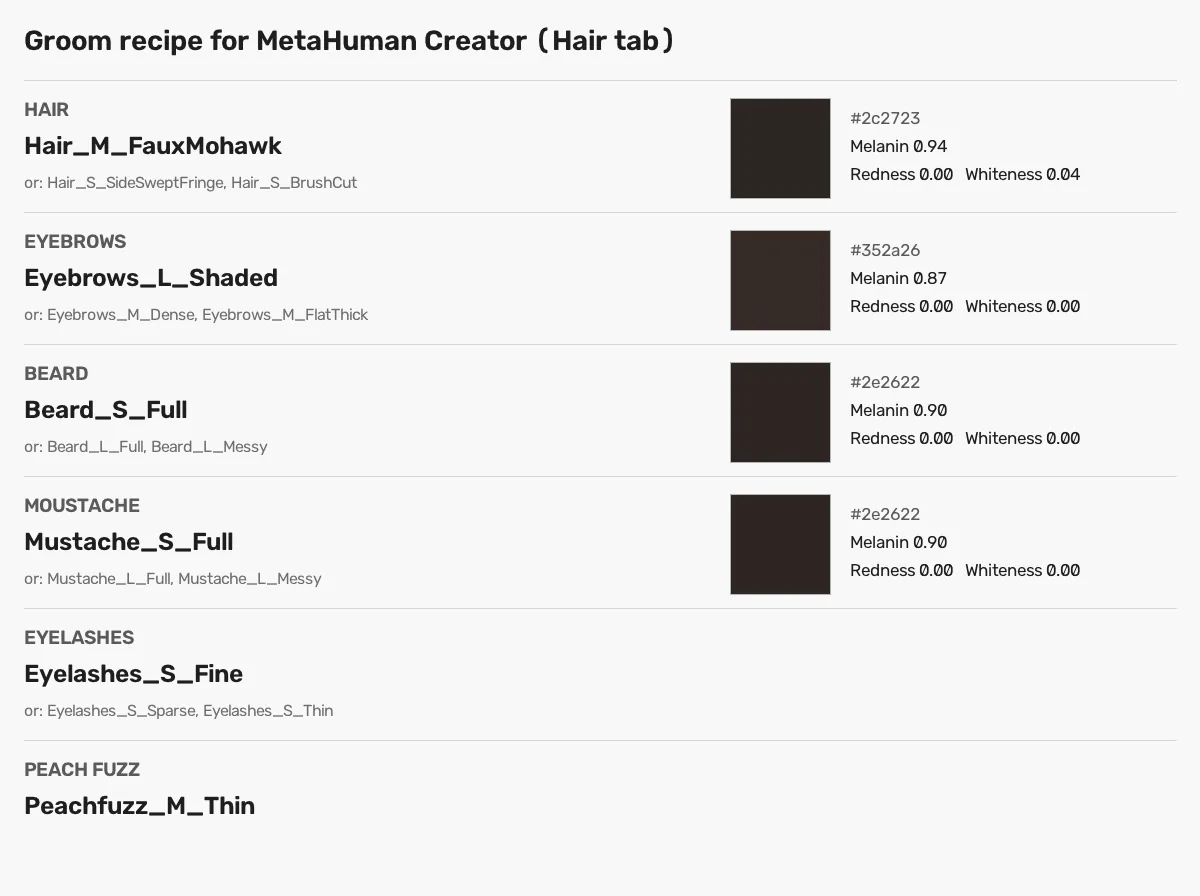
The groom sheet from the ZIP of sample S-16: the same names and values as groom.md.Sample S-16'sgroom.md, first lines# Groom recipe In MetaHuman Creator open the **Hair** tab (head hair, eyebrows, eyelashes, moustache, beard, peach fuzz), choose the groom below, then set its Melanin / Redness / Whiteness sliders. Colours are approximate: compare with the swatches in `groom_sheet.jpg`. ### Hair: `Hair_M_FauxMohawk` - alternatives: `Hair_S_SideSweptFringe`, `Hair_S_BrushCut` - colour: Melanin **0.94**, Redness **0.00**, Whiteness **0.04** (swatch #2c2723) ### Eyebrows: `Eyebrows_L_Shaded` - alternatives: `Eyebrows_M_Dense`, `Eyebrows_M_FlatThick` - colour: Melanin **0.87**, Redness **0.00**, Whiteness **0.00** (swatch #352a26) ### Beard: `Beard_S_Full` - alternatives: `Beard_L_Full`, `Beard_L_Messy`Choose a body
The neck is yours, down to the shoulders. Choose a body whose neck width matches, or the seam at the collar pinches.
Look at it, then use it
Turn the head and look from the side. From here it is an ordinary MetaHuman: animate it with Live Link Face, or stream as it with the free Creator Kit. The MetaHuman you build is licensed to you by Epic under its terms.
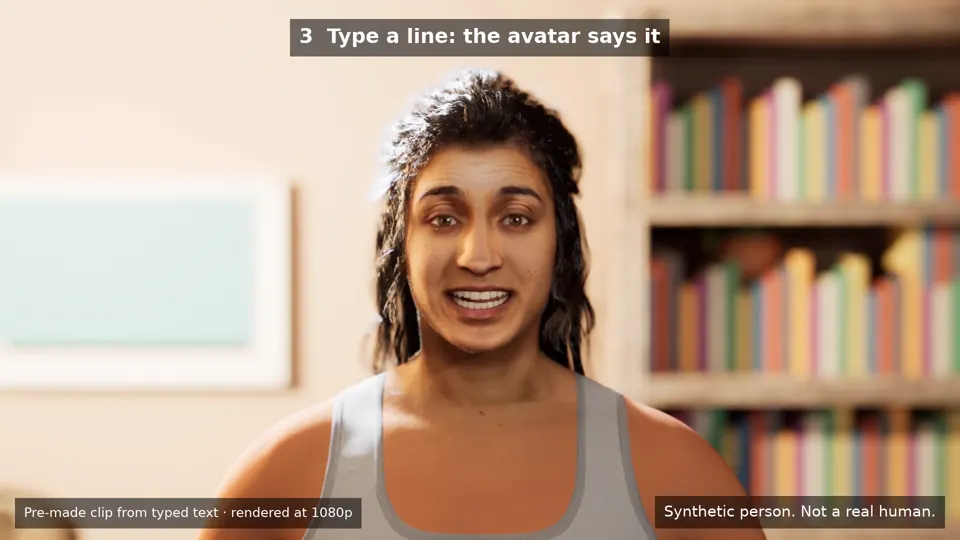
A FaceNinja head as a full MetaHuman in Unreal Engine 5.8, in the free Creator Kit's room. A synthetic person.
If something looks wrong
- Someone else's skin: Texture Override is off, or a map went into the wrong slot.
- The neck pinches at the collar: choose a body with a wider or narrower neck.
- Wrong size: keep uniform scale 1. The FBX is in centimetres, at life size.
- The ears are not mine: ears are not read from the photo.
- Black patches when the face moves (GLB or FBX outside MetaHuman Creator): tick Used with Morph Targets on the materials (docs).
Questions about making a MetaHuman of yourself
- 01Can I make a MetaHuman of myself for free?
- MetaHuman Creator comes with Unreal Engine at no extra cost under Epic's licence, and FaceNinja's 20 sample heads are free to download, so you can try every step now. A head from your own photos will be 1,500 credits when paid plans open, soon.
- 02Do I need several photos?
- No. One sharp, front-facing photo is enough. A profile and a three-quarter view of you help.
- 03Does this work in Unreal Engine 5.5 or older?
- These steps are for 5.6 or later, where MetaHuman Creator runs inside the editor. Older versions used a web version of MetaHuman Creator, with different steps.
- 04Can I stream or sell my MetaHuman?
- The MetaHuman you build in MetaHuman Creator is licensed to you by Epic, not by us: check Epic's licence before you ship or stream it. Use only your own face, or that of an adult who agreed.
Make a MetaHuman from your own photo.
Sign up free, download the sample heads, and make heads from your own photos when paid plans open.