Guide · Unity · Godot 4 · three.js
Use your head in Unity, Godot or three.js.
A FaceNinja head is a plain GLB or FBX on MetaHuman topology, with eyes, teeth, 4K textures and the 52 ARKit blendshapes, so it works outside Unreal too. Here is how to bring it into Unity, Godot 4 and three.js, and how to move the face from code.
Published
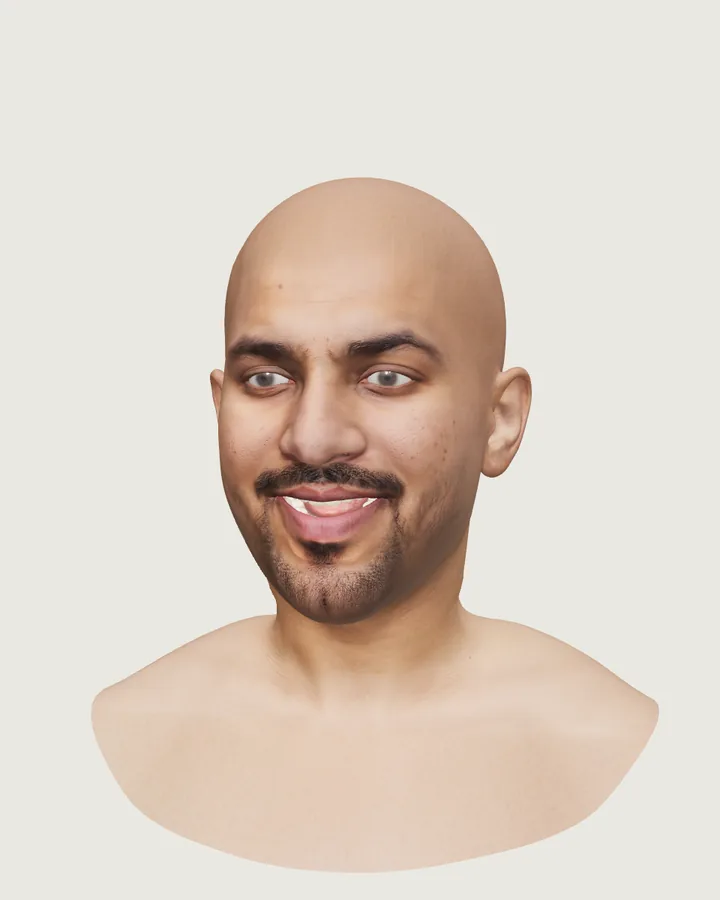
jawOpen and the two mouthSmile shapes turned up. Screenshot from our own test page.Which file for which engine
| Engine | File | Units |
|---|---|---|
| Unity | FBX with ARKit shapes | Centimetres; Unity converts them to metres |
| Godot 4 | GLB with ARKit shapes | Metres, Y-up |
| three.js | GLB with ARKit shapes | Metres, Y-up |
Both are life size. Hair is not in the GLB or the FBX: in Unreal, MetaHuman grooms replace it; in other engines, add hair of your own.
Can I use a MetaHuman in Unity?
A FaceNinja head is your own file, on MetaHuman topology, under our terms: use it in any engine. A MetaHuman you build in MetaHuman Creator comes under Epic's licence, which since June 2025 also allows other engines and tools (Epic's licence page).
Unity: import the FBX
Bring in the FBX
Download the FBX with ARKit shapes and drop it into your project's Assets folder.
Check the import settings
On the Model tab, keep Convert Units on, so the centimetres become metres, and Import BlendShapes on (the default). Apply.
Extract the materials
On the Materials tab, extract the textures and materials so you can edit them. In URP or HDRP, convert the materials to the pipeline's Lit shader.
Find the shapes
Place the head in a scene. The Skinned Mesh Renderer lists the 52 shapes under BlendShapes, named after the ARKit shapes.
Drive them from code
Weights in Unity run from 0 to 100.
Code// Unity (C#): the head's SkinnedMeshRenderer; Unity blend shape weights run 0–100 var smr = GetComponentInChildren<SkinnedMeshRenderer>(); var mesh = smr.sharedMesh; for (int i = 0; i < mesh.blendShapeCount; i++) if (mesh.GetBlendShapeName(i).EndsWith("jawOpen")) smr.SetBlendShapeWeight(i, 60f);
Prefer GLB? Unity reads it with a glTF importer package, such as glTFast.
Godot 4: import the GLB
Bring in the GLB
Download the GLB with ARKit shapes and copy it into your project. Godot imports it as a scene, in metres.
Find the shapes
Open the scene and select the head's MeshInstance3D. The Inspector lists the blend shapes by their ARKit names under Blend Shapes.
Drive them from code
Weights in Godot run from 0 to 1.
Code# Godot 4 (GDScript): the head's MeshInstance3D; weights run 0–1 @onready var head: MeshInstance3D = $Head func _ready(): var i := head.find_blend_shape_by_name("jawOpen") if i >= 0: head.set_blend_shape_value(i, 0.6)
three.js: load the GLB
Load it with GLTFLoader
The head opens as several meshes (skin, eyes, teeth and so on); each one carries the same 52 shape names.
Set the shapes by name
morphTargetDictionarymaps each ARKit name to its index inmorphTargetInfluences; weights run from 0 to 1.Code// three.js: every mesh of the head carries the same 52 names; weights run 0–1 import { GLTFLoader } from 'three/addons/loaders/GLTFLoader.js'; const gltf = await new GLTFLoader().loadAsync('head.glb'); gltf.scene.traverse((o) => { const i = o.morphTargetDictionary?.jawOpen; if (i !== undefined) o.morphTargetInfluences[i] = 0.6; }); scene.add(gltf.scene);Clear eyes
For clear, reflective eyes in three.js, download with the
cornea=transmissionoption, or swap the cornea materials when you load the file (docs).
We loaded this sample's GLB in three.js for this guide: it opens as 6 meshes, and each one lists all 52 ARKit names.
Good to know
- Same mesh, same rig. Every head has the same vertex order and UVs, so a setup you make for one head works for all of them.
- Scale. Every file is life size. The
measureddownload option scales a head to an estimate of the person's size. - Lighter files. Ask for 2K textures with the
texture_sizedownload option when 4K is more than you need. - The web preview is not for engines. Use the GLB or FBX, not the compressed preview the web app shows.
Questions about heads in Unity, Godot and three.js
- 01Can I use a MetaHuman in Unity?
- A FaceNinja head is a plain FBX or GLB, so yes. A full MetaHuman built in MetaHuman Creator may also be used in other engines under Epic's licence since June 2025; check its terms.
- 02Do the 52 blendshapes come in?
- Yes, by their ARKit names: as BlendShapes on the Skinned Mesh Renderer in Unity, Blend Shapes on the MeshInstance3D in Godot, and morph targets in three.js.
- 03Is there hair?
- Not in these files. In Unreal, MetaHuman grooms supply it; in other engines, add hair of your own.
- 04Which format is smaller?
- The GLB with ARKit shapes is about 105 MB with 4K textures, and the static GLB about 65 MB. 2K textures make both smaller.
Can I try a head with all 52 shapes?
Yes. Sign up free and download the 20 sample heads: every GLB and FBX has all 52.