FaceNinja

創作者套件 · 給 VTuber · 免費

你的臉。你的直播。

把你的 FaceNinja 頭部,變成會跟著你說話、動作的 MetaHuman,放在 Unreal Engine 5.8 的一個小舞台上。你的 AI 程式設計代理會依七段提示詞把它建好。你打字,它說話;你微笑,它也微笑。然後你用 OBS 擷取畫面。

版本 0.3.1 · 6.6 MB · MIT 授權 · Windows 與 Mac

給腳本和代理用的大小與 SHA-256:version.json

套件
版本0.3.1
下載大小6.6 MB · zip
授權MIT,營利頻道也可免費使用
需要Unreal Engine 5.8(免費)、一個 FaceNinja 頭部,以及一個能使用 MCP 的程式設計代理
執行環境Windows 10 或 11、macOS 14 或更新版本

一張照片,然後是一個會說話的頭部。

創作者套件示範影片
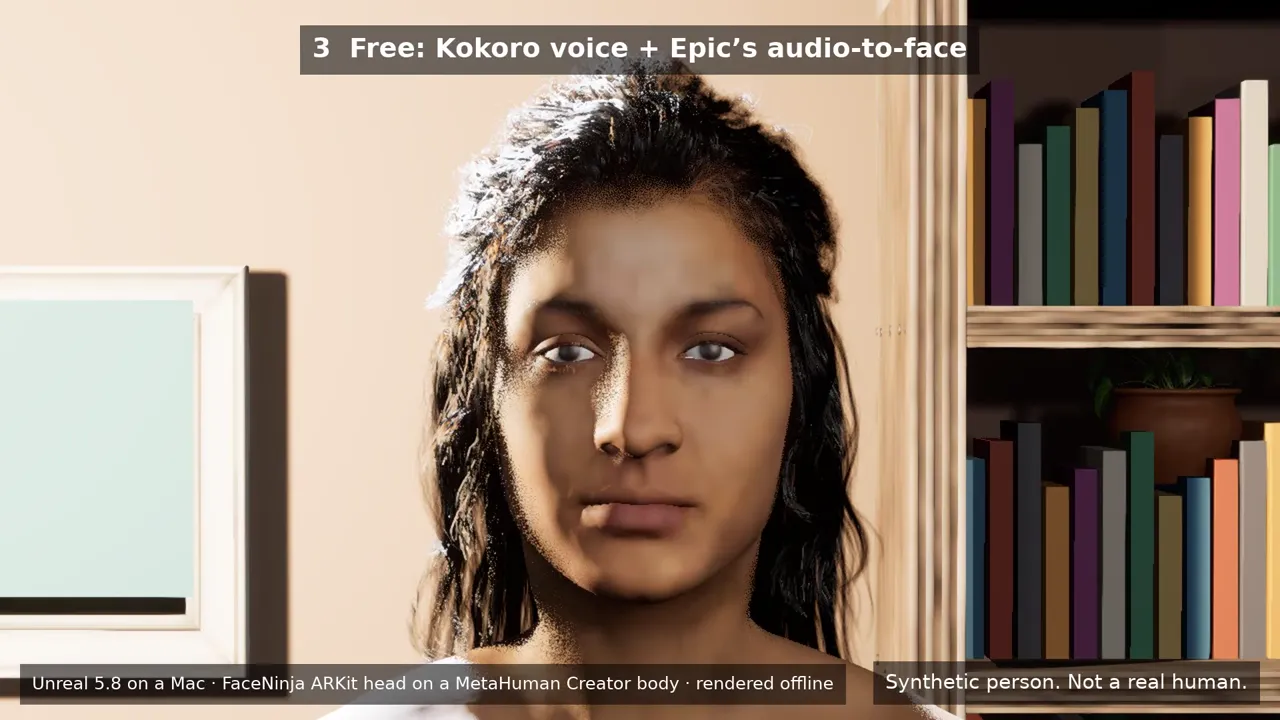
一張 AI 生成的照片,接著是用它做出的 FaceNinja 頭部,再來是這個頭部在套件的房間裡說話,以 Unreal 5.8 算圖。第一句:免費的 Kokoro 語音,搭配 Epic 免費的音訊口型同步。第二句:ElevenLabs 語音,搭配付費的 Runtime MetaHuman Lip Sync 外掛。說話的頭部是 FaceNinja 的 ARKit 頭部(52 個混合變形,blendshape),配上 MetaHuman Creator 的身體和頭髮,離線算圖。

這支影片裡的每個人都是合成的。請使用你自己的臉和聲音,或原創角色。

下載影片(MP4,7.3 MB)

三個部分,一個晚上。

  1. 你的頭部

    在 FaceNinja 用你的照片做出頭部,並下載 MetaHuman ZIP。

  2. 你的代理建好舞台

    解壓縮套件,在那個資料夾中開啟你的程式設計代理,依序貼上七段提示詞,一次一段。代理會透過 Unreal 自己的 MCP 伺服器和套件的工具來操作 Unreal。

  3. 你開始直播

    你的 iPhone 或網路攝影機驅動臉部動作。打一行字,你的虛擬形象就說出來。OBS 擷取視窗。

不用寫程式。每段提示詞結束時,都有你可以檢查的東西。

下載很小,一切都接好了。

直播間

一個溫暖的小房間,有沙發、書架、一盆植物和柔和的燈光,三個鏡頭(特寫、半身、廣角),以及一個可以開啟的綠幕。

你的 MetaHuman

一個工具匯入你的 MetaHuman ZIP,讓 MetaHuman Creator 的臉精確貼合它,並挑出最接近的頭髮、眉毛和睫毛。

臉部追蹤

iPhone 上的 Live Link Face,或 Epic 的網路攝影機臉部追蹤。

打字說話

電腦上的一個小面板和一台語音伺服器。免費的 Kokoro 語音在較新的顯示卡上,約 0.1 s 就會開始說話。

準備好接 OBS

在 1920×1080 的視窗中播放,供 OBS 視窗擷取,想用自己的背景時可以開綠幕。Mac 上的 NDI 和 Windows 上的 Spout 是可選的。

也有 GLB 與 FBX 頭部

套件也會匯入你頭部的 GLB 或 FBX,連同它的 52 個 ARKit 混合變形,以真人尺寸匯入,並設定好 Unreal 顯示它們所需的材質選項。

另附代理說明(AGENTS.md),以及給 Claude Code、Codex、Cursor、VS Code 和 Gemini CLI 的 MCP 設定。

你需要什麼。

電腦、軟體與帳號
項目建議最低
電腦搭配 NVIDIA RTX 3070 或更好顯示卡的 Windows 11,或 M2 Max 以上、32 GB 記憶體的 Mac有 RTX 顯示卡和 16 GB RAM 的 PC,或 M1 以上、16 GB 的 Mac(畫面更新率較低)
磁碟150 GB 可用空間100 GB 可用空間
軟體Unreal Engine 5.8、OBS、虛擬音訊線(VB-CABLE 或 BlackHole)和一個程式設計代理。提示詞 1 會和你一起檢查並安裝它們。
帳號FaceNinja,以及用於 MetaHuman Creator 的 rig 的免費 Epic Games 帳號
選用iPhone 12 或更新機型,搭配免費的 Live Link Face app網路攝影機

預設免費。

免費

  • 套件(MIT 授權)
  • Unreal Engine 5.8、MetaHuman Creator 和 Live Link Face
  • Epic 的音訊口型同步
  • OBS、BlackHole 和 VB-CABLE(歡迎捐款)
  • Kokoro 和 Chatterbox 語音,在你的電腦上執行

付費,只在你選擇時

  • 你的 FaceNinja 頭部,以點數計(價格)
  • ElevenLabs 語音,使用你自己的 ElevenLabs 帳號,由 ElevenLabs 依字元計費
  • Fab 上的 Runtime MetaHuman Lip Sync 外掛:年收入低於 US$100,000 的創作者,每個席次約 US$280,高於的話是 US$840

Unreal 不對直播或錄製的影片收取權利金。其他公司產品的價格為 2026 年 10 月的資料,請查看它們的網站。

複製、貼上、檢查。

依序貼上,一次一段,等你的代理做完再貼下一段。每一段結束時都會告訴你應該看到什麼。

每個語言版本的提示詞都維持英文,因為你的代理需要原樣的工具和檔案名稱。你可以用自己的語言和代理交談。

01 · 安裝你需要的東西

時間:20–90 分鐘,大多是下載

提示詞 · 英文
I am setting up the FaceNinja Creator Kit in this folder. I do not write code, so explain each step in one short
sentence and ask me before anything that needs my password, installs a driver, or changes system settings.

1. Tell me my operating system, CPU, RAM, graphics card and free disk space, and compare them with the
   "What you need" table in GUIDE.md. Warn me if something is below the minimum.
2. Check what is installed and tell me what is missing:
   - Unreal Engine 5.8 (Windows: C:\Program Files\Epic Games\UE_5.8; Mac: /Users/Shared/Epic Games/UE_5.8).
     If it is missing, do not install it yourself: tell me to install Unreal Engine 5.8 from the Epic Games
     Launcher's Library tab (default options), and wait until I say it is done.
   - OBS Studio. Offer to install it (Windows: winget install OBSProject.OBSStudio; Mac: brew install --cask obs).
   - A virtual audio cable. Windows: VB-CABLE from https://vb-audio.com/Cable/ (I run its installer as
     administrator and restart). Mac: brew install --cask blackhole-2ch (it asks for my password).
     Only from these places.
   - uv (https://docs.astral.sh/uv/getting-started/installation/).
3. In tts/, make the voice environment: uv venv -p 3.11, then uv pip install -r requirements-kokoro.txt
   (on a PC with an NVIDIA card add --extra-index-url https://download.pytorch.org/whl/cu128).
4. Run uv run python server.py --list-devices in tts/ and show me the output devices.

End with a checklist: Unreal 5.8, OBS, virtual cable, voice environment, each with a tick or a cross.

你應該會看到: 四個勾:Unreal 5.8、OBS、音訊線和語音。

02 · 把你的代理連到 Unreal

時間:10–20 分鐘

提示詞 · 英文
Open the kit's Unreal project and connect to Unreal's own MCP server.

1. Open FaceNinjaCreatorKit/FaceNinjaCreatorKit.uproject with Unreal Engine 5.8 (Mac: open -a with
   "/Users/Shared/Epic Games/UE_5.8/Engine/Binaries/Mac/UnrealEditor.app" and the project path; Windows:
   "C:\Program Files\Epic Games\UE_5.8\Engine\Binaries\Win64\UnrealEditor.exe" with the project path).
   Tell me the first start takes several minutes while it compiles shaders.
2. The project starts Unreal's MCP server at http://127.0.0.1:8000/mcp. This folder already has the MCP
   settings for you (.mcp.json, .cursor, .vscode, .gemini, .codex). If you cannot see an "unreal-mcp" server,
   tell me how to reload your MCP settings, or add that URL yourself.
3. Wait until the server answers, then list the toolsets. You should find FaceNinjaKitTools. Describe it and
   tell me in one sentence per tool what you can now do for me.

你應該會看到: 你的代理列出 FaceNinja 的工具。

03 · 建好你的舞台

時間:2–5 分鐘

提示詞 · 英文
Using FaceNinjaKitTools in Unreal, build my streaming stage.

1. Call build_stage. It makes a small room with a sofa, a bookshelf, a plant, lights and three cameras.
2. Take a still from each camera with stage_screenshot (closeup, bust, wide) and show them to me.
3. Ask me which camera I want for streaming and call set_camera with it.

你應該會看到: 三張房間的靜態畫面。

04 · 匯入你的 FaceNinja 頭部

時間:15–30 分鐘

提示詞 · 英文
Using FaceNinjaKitTools in Unreal, turn my FaceNinja head into a MetaHuman and put it on my stage.
My head ZIP is: <drag the ZIP file here>

1. Call import_head_zip with that path. Tell me which hair, brows and lashes it picked.
2. Tell me that the next step sends my head's shape (not my photos) to Epic's free MetaHuman service, and that
   a browser window may ask me to sign in to my Epic account. Wait for my OK.
3. Call preview_avatar so I can see my head in the room, and show me a stage_screenshot (bust camera).
4. Call rig_head, then download_head_textures. Tell me: "A browser opens Epic's sign-in page. Unreal stops
   answering until you sign in and approve it there; that is normal." Wait until I say I approved it, then
   check head_status every 30 seconds until rigged and high_res_textures are both true.
5. Once rigged: call build_metahuman, then place_avatar.
6. Take a stage_screenshot with the bust camera and show it to me.

你應該會看到: 你的 MetaHuman 出現在房間裡。

05 · 連接你的 iPhone 或網路攝影機

時間:10 分鐘

提示詞 · 英文
Using FaceNinjaKitTools in Unreal, connect my iPhone's Live Link Face app to my avatar.

1. Call my_ip_address. Tell me where to type it in the app (Settings > Live Link > Add Target, port 14785).
2. Ask me for the phone's IP address (Live Link Face shows it in its settings), then call connect_iphone.
3. Call connect_face with FN_iPhone, then play_in_window.
4. Ask me to smile, blink and turn my head, and whether the avatar follows. Ask before changing any firewall
   setting.

你應該會看到: 虛擬形象複製你的臉。

06 · 打字說話

時間:10 分鐘

提示詞 · 英文
Start the kit's voice server and connect it to my avatar.

1. Ask me which voice I want:
   a. a free preset voice that runs on my computer (Kokoro, default),
   b. my own voice (Chatterbox): ask me to record 10-20 seconds of myself reading any text in a quiet room as
      tts/my_voice.wav, then set it up with requirements-chatterbox.txt,
   c. a studio voice from ElevenLabs: it needs my own ElevenLabs account, costs money per line and sends my text to ElevenLabs.
      Ask me to put my own ElevenLabs API key in the ELEVENLABS_API_KEY environment variable myself; never write it to a file.
2. In tts/ start the server in the background with my cable as --device ("BlackHole" on a Mac, "CABLE Input" on
   Windows):
   a. uv run python server.py --engine kokoro --preset af_heart --device "<cable>"
   b. uv run python server.py --engine chatterbox-turbo --voice my_voice.wav --device "<cable>"
   c. uv run python server.py --engine elevenlabs --voice Rachel --device "<cable>"
3. In Unreal, using FaceNinjaKitTools: voice_status, then connect_voice (it listens on the cable), then
   connect_face with FN_Voice, then play_in_window, then open_talk_panel.
4. Call say with "Hi everyone, welcome back to the stream!" and ask me if the lips moved with the voice.

你應該會看到: 它說出你打的那一行,嘴唇也會動。

07 · 用 OBS 開始直播

時間:10 分鐘

提示詞 · 英文
Help me show my avatar in OBS Studio.

1. In Unreal, using FaceNinjaKitTools: play_in_window (1920x1080). If I want my own background instead of the
   room, call set_green_screen with true first.
2. In OBS add a "Window Capture" (Windows) or "macOS Screen Capture" set to that Unreal window. Tell me the
   clicks; you cannot click in OBS for me.
3. Only with the green screen: add a "Chroma Key" filter (key colour green) and show me where "Similarity" is.
4. Add an "Audio Input Capture" of "CABLE Output" (Windows) or "BlackHole 2ch" (Mac), and set its
   "Audio Monitoring" to "Monitor and Output" so I hear the voice too.

你應該會看到: 你的虛擬形象出現在 OBS 中,連同它的聲音。

每個步驟,以及出問題時該怎麼做,都在 zip 裡的 GUIDE.md。

三種語音。

打字說話可用的語音
語音執行位置首次發聲費用備註
Kokoro(預設)你的電腦RTX 5080 上約 0.08 s,M5 Max Mac 上約 0.09 s免費(Apache-2.0)8 種語言、54 個預設語音
你自己的聲音(Chatterbox)你的電腦RTX 5080 或 M5 Max Mac 上約 0.7–1.1 s免費(MIT)用你自己 10–20 秒的錄音。每段音訊都帶有聽不見的浮水印,標示它是合成的。
雲端語音(ElevenLabs)雲端取決於你的連線;我們沒有測量由 ElevenLabs 依字元計費,依你的方案你打的字會送到 ElevenLabs。你要自備 ElevenLabs 帳號和 API 金鑰。

首次發聲:從送出一行字到第一段音訊的時間,於 2026 年 10 月透過套件的語音伺服器測得。

關於套件的問題。

01我需要寫程式嗎?
不需要。你貼上提示詞;你的代理會執行工具,並用圖片向你展示結果。
02Mac 上能用嗎?
可以,M1 以上的 Mac 搭配 Unreal 5.8。Epic 的即時臉部工具從 Unreal 5.8 起能在 Mac 上執行。
03哪些東西會離開我的電腦?
MetaHuman Creator 建立 rig 時,你頭部的形狀會送到 Epic。如果你選雲端語音,你打的字會送到 ElevenLabs。除此之外沒有其他東西:沒有照片,沒有錄音。
04我可以販售用它做的影片嗎?
可以。套件是 MIT,Unreal 不對影片收取權利金,Kokoro 和 Chatterbox 也允許商業使用。其他部分,請查看 ElevenLabs 和 Fab 的條款。
05付費的口型同步外掛有包含嗎?
沒有。它在 Fab 上依席次販售。免費方案使用 Epic 自己的音訊口型同步。
06我可以把虛擬形象分享成 app 嗎?
用免費的口型同步不行:Epic 的音訊來源在編輯器中(Play)運作,VTuber 直播就是這樣執行的。打包成 app 需要付費外掛。
07我只有 GLB 或 FBX,可以用嗎?
可以,用於靜態圖和動畫。檔案的單位是公尺,所以頭部會以真人尺寸匯入,套件也會在它的材質上開啟 Used with Morph Targets,讓混合變形不會顯示成黑色。即時的臉部和聲音驅動的是 MetaHuman,所以直播請使用 MetaHuman ZIP。更多內容見 Unreal 說明 EN。

授權。

套件是 MIT(zip 裡的 LICENSE)。房間的美術素材是來自 Poly Haven 的 CC0。其他所有東西(Unreal、MetaHuman、OBS、音訊線、語音、選用的外掛)都由你自己安裝,適用各自的授權;zip 裡的 THIRD_PARTY.md 逐一列出,並附上連結。

準備好了嗎?先做出你的頭部,再下載套件。