הופכים את ראש ה-FaceNinja שלכם ל-MetaHuman שמדבר ומתנועע איתכם, על במה קטנה ב-Unreal Engine 5.8. סוכן הקוד שלכם בונה אותו משבע הנחיות. אתם מקלידים, והוא מדבר; אתם מחייכים, והוא מחייך. ואז מצלמים אותו ב-OBS.
Unreal Engine 5.8 (חינם), ראש FaceNinja וסוכן קוד שיכול להשתמש ב-MCP
פועל על
Windows 10 או 11, macOS 14 ואילך
תמונה אחת, ואז ראש שמדבר.
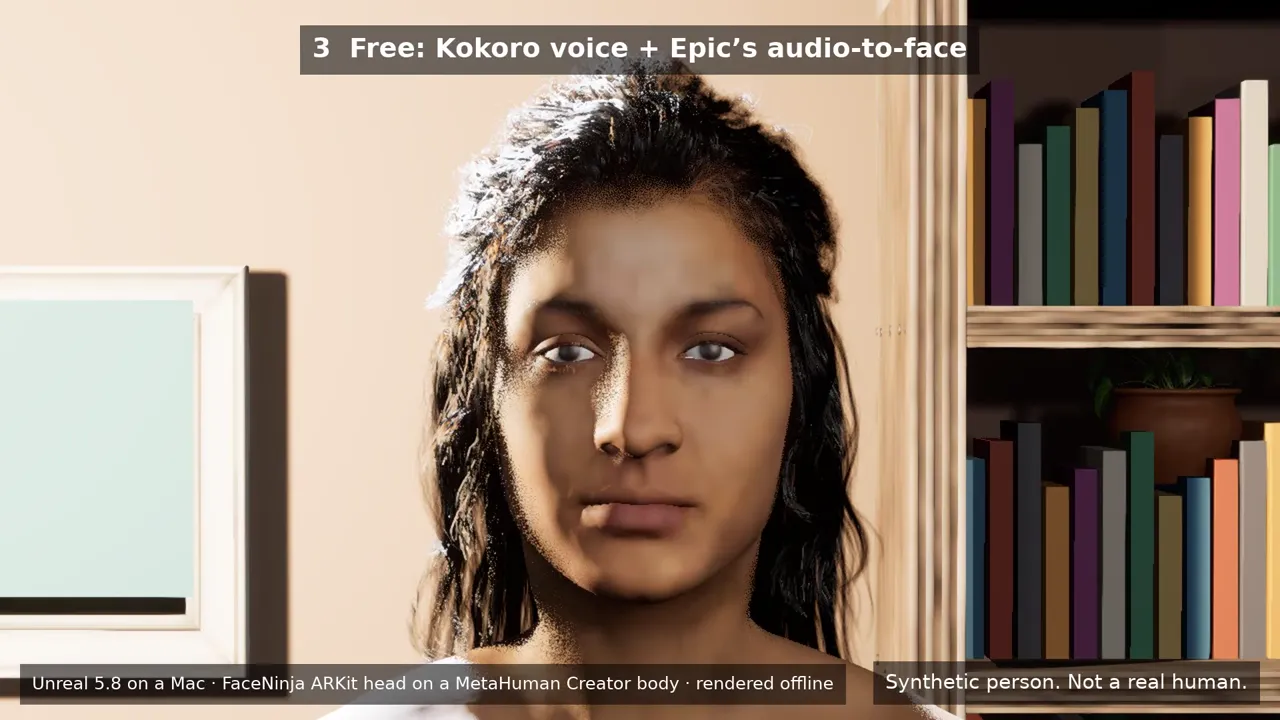
תמונה אחת שנוצרה ב-AI, אחריה ראש FaceNinja שנוצר ממנה, ואחריו הראש הזה מדבר בחדר של הערכה, ברינדור ב-Unreal 5.8. השורה הראשונה: קול Kokoro החינמי עם סנכרון השפתיים החינמי של Epic מתוך אודיו. השורה השנייה: קול של ElevenLabs עם התוסף בתשלום Runtime MetaHuman Lip Sync. הראש המדבר הוא ראש ARKit של FaceNinja (52 blendshapes) על הגוף והשיער של MetaHuman Creator, ברינדור לא בזמן אמת.
כל האנשים בסרטון הזה סינתטיים. משתמשים בפנים ובקול של עצמכם, או בדמות מקורית.
קולות ElevenLabs, בחשבון ElevenLabs שלכם ובחיוב של ElevenLabs לפי תו
התוסף Runtime MetaHuman Lip Sync ב-Fab: כ-280 $ למושב ליוצרים שהכנסתם מתחת ל-100,000 $ בשנה, 840 $ מעל
Unreal לא גובה תמלוגים על וידאו משודר או מוקלט. מחירי מוצרים של חברות אחרות נכון לאוקטובר 2026; יש לבדוק באתרים שלהן.
מעתיקים, מדביקים, בודקים.
מדביקים אותן לפי הסדר, אחת בכל פעם, וממתינים עד שהסוכן מסיים. כל אחת מסתיימת במה שאמור להופיע.
ההנחיות נשארות באנגלית בכל גרסאות השפה, כי הסוכן צריך את שמות הכלים והקבצים במדויק. אפשר לדבר עם הסוכן בשפה שלכם.
01 · התקנת מה שצריך
משך: 20–90 דקות, בעיקר הורדות
הנחיה · אנגלית
I am setting up the FaceNinja Creator Kit in this folder. I do not write code, so explain each step in one short
sentence and ask me before anything that needs my password, installs a driver, or changes system settings.

1. Tell me my operating system, CPU, RAM, graphics card and free disk space, and compare them with the
   "What you need" table in GUIDE.md. Warn me if something is below the minimum.
2. Check what is installed and tell me what is missing:
   - Unreal Engine 5.8 (Windows: C:\Program Files\Epic Games\UE_5.8; Mac: /Users/Shared/Epic Games/UE_5.8).
     If it is missing, do not install it yourself: tell me to install Unreal Engine 5.8 from the Epic Games
     Launcher's Library tab (default options), and wait until I say it is done.
   - OBS Studio. Offer to install it (Windows: winget install OBSProject.OBSStudio; Mac: brew install --cask obs).
   - A virtual audio cable. Windows: VB-CABLE from https://vb-audio.com/Cable/ (I run its installer as
     administrator and restart). Mac: brew install --cask blackhole-2ch (it asks for my password).
     Only from these places.
   - uv (https://docs.astral.sh/uv/getting-started/installation/).
3. In tts/, make the voice environment: uv venv -p 3.11, then uv pip install -r requirements-kokoro.txt
   (on a PC with an NVIDIA card add --extra-index-url https://download.pytorch.org/whl/cu128).
4. Run uv run python server.py --list-devices in tts/ and show me the output devices.

End with a checklist: Unreal 5.8, OBS, virtual cable, voice environment, each with a tick or a cross.
מה אמור להופיע: ארבעה סימני וי: Unreal 5.8, OBS, הכבל והקול.
02 · חיבור הסוכן ל-Unreal
משך: 10–20 דקות
הנחיה · אנגלית
Open the kit's Unreal project and connect to Unreal's own MCP server.

1. Open FaceNinjaCreatorKit/FaceNinjaCreatorKit.uproject with Unreal Engine 5.8 (Mac: open -a with
   "/Users/Shared/Epic Games/UE_5.8/Engine/Binaries/Mac/UnrealEditor.app" and the project path; Windows:
   "C:\Program Files\Epic Games\UE_5.8\Engine\Binaries\Win64\UnrealEditor.exe" with the project path).
   Tell me the first start takes several minutes while it compiles shaders.
2. The project starts Unreal's MCP server at http://127.0.0.1:8000/mcp. This folder already has the MCP
   settings for you (.mcp.json, .cursor, .vscode, .gemini, .codex). If you cannot see an "unreal-mcp" server,
   tell me how to reload your MCP settings, or add that URL yourself.
3. Wait until the server answers, then list the toolsets. You should find FaceNinjaKitTools. Describe it and
   tell me in one sentence per tool what you can now do for me.
מה אמור להופיע: הסוכן מציג את רשימת הכלים של FaceNinja.
03 · בניית הבמה
משך: 2–5 דקות
הנחיה · אנגלית
Using FaceNinjaKitTools in Unreal, build my streaming stage.

1. Call build_stage. It makes a small room with a sofa, a bookshelf, a plant, lights and three cameras.
2. Take a still from each camera with stage_screenshot (closeup, bust, wide) and show them to me.
3. Ask me which camera I want for streaming and call set_camera with it.
מה אמור להופיע: שלוש תמונות סטילס של החדר.
04 · הכנסת ראש ה-FaceNinja שלכם
משך: 15–30 דקות
הנחיה · אנגלית
Using FaceNinjaKitTools in Unreal, turn my FaceNinja head into a MetaHuman and put it on my stage.
My head ZIP is: <drag the ZIP file here>

1. Call import_head_zip with that path. Tell me which hair, brows and lashes it picked.
2. Tell me that the next step sends my head's shape (not my photos) to Epic's free MetaHuman service, and that
   a browser window may ask me to sign in to my Epic account. Wait for my OK.
3. Call preview_avatar so I can see my head in the room, and show me a stage_screenshot (bust camera).
4. Call rig_head, then download_head_textures. Tell me: "A browser opens Epic's sign-in page. Unreal stops
   answering until you sign in and approve it there; that is normal." Wait until I say I approved it, then
   check head_status every 30 seconds until rigged and high_res_textures are both true.
5. Once rigged: call build_metahuman, then place_avatar.
6. Take a stage_screenshot with the bust camera and show it to me.
מה אמור להופיע: ה-MetaHuman שלכם בחדר.
05 · חיבור ה-iPhone או מצלמת הרשת
משך: 10 דקות
הנחיה · אנגלית
Using FaceNinjaKitTools in Unreal, connect my iPhone's Live Link Face app to my avatar.

1. Call my_ip_address. Tell me where to type it in the app (Settings > Live Link > Add Target, port 14785).
2. Ask me for the phone's IP address (Live Link Face shows it in its settings), then call connect_iphone.
3. Call connect_face with FN_iPhone, then play_in_window.
4. Ask me to smile, blink and turn my head, and whether the avatar follows. Ask before changing any firewall
   setting.
מה אמור להופיע: האווטאר מעתיק את הפנים שלכם.
06 · מקלידים ומדברים
משך: 10 דקות
הנחיה · אנגלית
Start the kit's voice server and connect it to my avatar.

1. Ask me which voice I want:
   a. a free preset voice that runs on my computer (Kokoro, default),
   b. my own voice (Chatterbox): ask me to record 10-20 seconds of myself reading any text in a quiet room as
      tts/my_voice.wav, then set it up with requirements-chatterbox.txt,
   c. a studio voice from ElevenLabs: it needs my own ElevenLabs account, costs money per line and sends my text to ElevenLabs.
      Ask me to put my own ElevenLabs API key in the ELEVENLABS_API_KEY environment variable myself; never write it to a file.
2. In tts/ start the server in the background with my cable as --device ("BlackHole" on a Mac, "CABLE Input" on
   Windows):
   a. uv run python server.py --engine kokoro --preset af_heart --device "<cable>"
   b. uv run python server.py --engine chatterbox-turbo --voice my_voice.wav --device "<cable>"
   c. uv run python server.py --engine elevenlabs --voice Rachel --device "<cable>"
3. In Unreal, using FaceNinjaKitTools: voice_status, then connect_voice (it listens on the cable), then
   connect_face with FN_Voice, then play_in_window, then open_talk_panel.
4. Call say with "Hi everyone, welcome back to the stream!" and ask me if the lips moved with the voice.
מה אמור להופיע: הוא אומר את השורה שלכם עם שפתיים נעות.
07 · עולים לאוויר עם OBS
משך: 10 דקות
הנחיה · אנגלית
Help me show my avatar in OBS Studio.

1. In Unreal, using FaceNinjaKitTools: play_in_window (1920x1080). If I want my own background instead of the
   room, call set_green_screen with true first.
2. In OBS add a "Window Capture" (Windows) or "macOS Screen Capture" set to that Unreal window. Tell me the
   clicks; you cannot click in OBS for me.
3. Only with the green screen: add a "Chroma Key" filter (key colour green) and show me where "Similarity" is.
4. Add an "Audio Input Capture" of "CABLE Output" (Windows) or "BlackHole 2ch" (Mac), and set its
   "Audio Monitoring" to "Monitor and Output" so I hear the voice too.
מה אמור להופיע: האווטאר שלכם ב-OBS, עם הקול שלו.
כל שלב, ומה לעשות כשמשהו לא עובד, מופיע ב-GUIDE.md שבקובץ ה-ZIP.
שלושה סוגי קול.
קולות לתכונה “מקלידים ומדברים”
קול
פועל על
צליל ראשון
עלות
הערות
Kokoro (ברירת מחדל)
המחשב שלכם
כ-0.08 s ב-RTX 5080, 0.09 s ב-Mac עם M5 Max
חינם (Apache-2.0)
54 קולות מוכנים ב-8 שפות
הקול שלכם (Chatterbox)
המחשב שלכם
כ-0.7–1.1 s ב-RTX 5080 או ב-Mac עם M5 Max
חינם (MIT)
מהקלטה של 10–20 שניות של הקול שלכם. כל קליפ נושא סימן מים בלתי נשמע שמסמן אותו כסינתטי.
קול בענן (ElevenLabs)
הענן
תלוי בחיבור שלכם; לא נמדד על ידינו
מחויב על ידי ElevenLabs, לפי תו, בהתאם לתוכנית שלכם
השורות שמקלידים נשלחות אל ElevenLabs. מביאים חשבון ElevenLabs ומפתח API משלכם.
צליל ראשון: הזמן משליחת שורה ועד האודיו הראשון, נמדד דרך שרת הקול של הערכה באוקטובר 2026.
הפנים שלכם, הקול שלכם.
משתמשים בפנים שלכם ובקול שלכם, בדמות מקורית, או באדם שהסכים בכתב. אין ליצור דמות שדומה לסלבריטי, לסטרימר או לכל אדם אחר, ואין לשבט את הקול של אף אחד אחר. זו התחזות: היא עלולה להפר את החוק (זכויות האישיות והפרסום, personality and publicity rights), והיא מפרה את הכללים של YouTube, של Twitch ושל Epic.
שאלות על הערכה.
01צריך לכתוב קוד?
לא. מדביקים הנחיות; הסוכן מפעיל את הכלים ומראה תמונות של התוצאה.
02זה עובד על Mac?
כן, על Mac עם M1 ומעלה ו-Unreal 5.8. כלי הפנים בזמן אמת של Epic רצים על Mac החל מ-Unreal 5.8.
03מה יוצא מהמחשב שלי?
צורת הראש שלכם נשלחת אל Epic כש-MetaHuman Creator בונה את הריג. אם בוחרים בקול בענן, השורות שמקלידים נשלחות אל ElevenLabs. שום דבר אחר: בלי תמונות, בלי הקלטות.
04אפשר למכור סרטונים שנוצרו בעזרתה?
כן. הערכה היא MIT, Unreal לא גובה תמלוגים על וידאו, ו-Kokoro ו-Chatterbox מתירים שימוש מסחרי. יש לבדוק את התנאים של ElevenLabs ושל Fab עבור החלקים שלהם.
05התוסף בתשלום לסנכרון שפתיים כלול?
לא. הוא נמכר לפי מושב ב-Fab. המסלול החינמי משתמש בסנכרון השפתיים של Epic עצמה מתוך אודיו.
06אפשר לשתף את האווטאר שלי כאפליקציה?
לא עם סנכרון השפתיים החינמי: מקור האודיו של Epic עובד בעורך (Play), וכך רץ סטרים של VTuber. אפליקציה ארוזה דורשת את התוסף בתשלום.
07יש לי רק GLB או FBX. אפשר להשתמש בהם?
כן, לתמונות סטילס ולאנימציה. הקבצים במטרים, ולכן הראש נכנס בגודל טבעי, והערכה מפעילה את Used with Morph Targets בחומרים שלה כדי שה-blendshapes לא יוצגו שחורים. פנים וקול חיים מפעילים את ה-MetaHuman, ולכן לסטרימינג משתמשים ב-MetaHuman ZIP. עוד בהערות על UnrealEN.
רישיונות.
הערכה היא MIT (LICENSE בקובץ ה-ZIP). הנכסים הגרפיים של החדר הם CC0 מ-Poly Haven. כל השאר (Unreal, MetaHuman, OBS, הכבל, הקולות והתוסף האופציונלי) מתקינים בעצמכם, לפי הרישיון שלו; THIRD_PARTY.md בקובץ ה-ZIP מפרט כל אחד עם הקישור שלו.