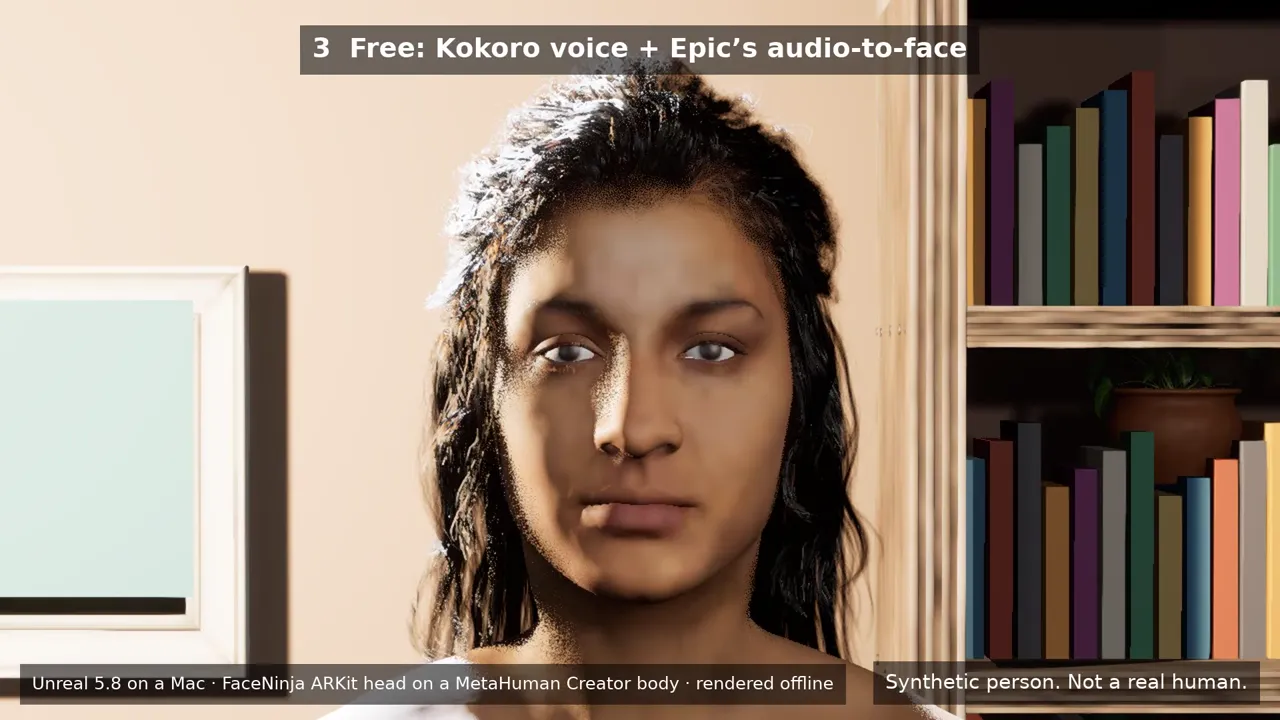
Trasforma la tua testa FaceNinja in un MetaHuman che parla e si muove con te, su un piccolo palco in Unreal Engine 5.8. Il tuo agente di coding lo costruisce da sette prompt. Tu scrivi, l'avatar parla; tu sorridi, l'avatar sorride. Poi lo catturi in OBS.
Versione 0.3.1 · 6,6 MB · licenza MIT · Windows e Mac
Dimensione e SHA-256 per script e agenti: version.json
Il kit
Versione
0.3.1
Download
6,6 MB · zip
Licenza
MIT, gratis anche per canali monetizzati
Requisiti
Unreal Engine 5.8 (gratis), una testa FaceNinja e un agente di coding che sappia usare MCP
Funziona su
Windows 10 o 11, macOS 14 o successivo
Una foto, poi una testa che parla.
Una foto generata con l'IA, poi la testa FaceNinja creata da quella foto, poi quella testa che parla nella stanza del kit, renderizzata in Unreal 5.8. Prima battuta: la voce gratuita Kokoro con il lip sync da audio gratuito di Epic. Seconda battuta: una voce ElevenLabs con il plugin a pagamento Runtime MetaHuman Lip Sync. La testa che parla è la testa ARKit di FaceNinja (52 blendshape) sul corpo e sui capelli di MetaHuman Creator, renderizzata offline.
Tutte le persone in questo video sono sintetiche. Usa il tuo volto e la tua voce, o un personaggio originale.
Crea una testa dalle tue foto in FaceNinja e scarica il MetaHuman ZIP.
Il tuo agente costruisce il palco
Decomprimi il kit, apri il tuo agente di coding in quella cartella e incolla sette prompt, uno alla volta. L'agente pilota Unreal tramite il server MCP di Unreal e gli strumenti del kit.
Vai in streaming
Il volto si muove con il tuo iPhone o la webcam. Scrivi una riga e il tuo avatar la dice. OBS cattura la finestra.
Nessun codice da scrivere. Ogni prompt finisce con qualcosa che puoi verificare.
Download piccolo, tutto collegato.
Una stanza per lo streaming
Una stanzetta accogliente con divano, libreria, una pianta e luci soffuse, tre camere (primo piano, busto, campo largo) e un green screen che puoi attivare.
Il tuo MetaHuman
Uno strumento importa il tuo MetaHuman ZIP, adatta con precisione il volto di MetaHuman Creator e sceglie i capelli, le sopracciglia e le ciglia più vicini.
Face tracking
Live Link Face su iPhone, oppure il face tracking da webcam di Epic.
Scrivi per parlare
Un piccolo pannello e un server vocale sul tuo computer. La voce gratuita Kokoro inizia a parlare in circa 0,1 s su una scheda grafica recente.
Pronto per OBS
Si avvia in una finestra 1920×1080 per la cattura finestra di OBS, con un green screen quando vuoi uno sfondo tuo. NDI su Mac e Spout su Windows sono opzioni.
Anche teste GLB e FBX
Il kit importa anche il GLB o l'FBX della tua testa con i suoi 52 blendshape ARKit, a grandezza naturale e con l'impostazione del materiale che Unreal richiede per mostrarli.
Più note per gli agenti (AGENTS.md) e impostazioni MCP per Claude Code, Codex, Cursor, VS Code e Gemini CLI.
Cosa ti serve.
Computer, software e account
Cosa
Consigliato
Minimo
Computer
Windows 11 con una NVIDIA RTX 3070 o superiore, oppure un Mac con M2 Max o successivo e 32 GB di memoria
Un PC con scheda RTX e 16 GB di RAM, oppure un Mac con M1 o successivo e 16 GB (frame rate più basso)
Disco
150 GB liberi
100 GB liberi
Software
Unreal Engine 5.8, OBS, un cavo audio virtuale (VB-CABLE o BlackHole) e un agente di coding. Il prompt 1 li controlla e li installa insieme a te.
Account
FaceNinja, e un account Epic Games gratuito per il rig di MetaHuman Creator
Facoltativo
Un iPhone 12 o successivo con l'app gratuita Live Link Face
Una webcam
Gratis per impostazione predefinita.
Gratis
Il kit (licenza MIT)
Unreal Engine 5.8, MetaHuman Creator e Live Link Face
Le voci ElevenLabs, sul tuo account ElevenLabs e fatturate da ElevenLabs per carattere
Il plugin Runtime MetaHuman Lip Sync su Fab: circa 280 USD per postazione per creator sotto 100.000 USD l'anno, 840 USD sopra
Unreal non applica royalty sui video in streaming o registrati. Prezzi dei prodotti di altre aziende a ottobre 2026; controlla i loro siti.
Copia, incolla, verifica.
Incollali in ordine, uno alla volta, e aspetta che il tuo agente abbia finito. Ognuno finisce con ciò che dovresti vedere.
I prompt restano in inglese in ogni versione linguistica, perché il tuo agente ha bisogno dei nomi esatti di strumenti e file. Puoi parlare con il tuo agente nella tua lingua.
01 · Installa ciò che serve
Tempo: 20–90 minuti, per lo più download
Prompt · inglese
I am setting up the FaceNinja Creator Kit in this folder. I do not write code, so explain each step in one short
sentence and ask me before anything that needs my password, installs a driver, or changes system settings.

1. Tell me my operating system, CPU, RAM, graphics card and free disk space, and compare them with the
   "What you need" table in GUIDE.md. Warn me if something is below the minimum.
2. Check what is installed and tell me what is missing:
   - Unreal Engine 5.8 (Windows: C:\Program Files\Epic Games\UE_5.8; Mac: /Users/Shared/Epic Games/UE_5.8).
     If it is missing, do not install it yourself: tell me to install Unreal Engine 5.8 from the Epic Games
     Launcher's Library tab (default options), and wait until I say it is done.
   - OBS Studio. Offer to install it (Windows: winget install OBSProject.OBSStudio; Mac: brew install --cask obs).
   - A virtual audio cable. Windows: VB-CABLE from https://vb-audio.com/Cable/ (I run its installer as
     administrator and restart). Mac: brew install --cask blackhole-2ch (it asks for my password).
     Only from these places.
   - uv (https://docs.astral.sh/uv/getting-started/installation/).
3. In tts/, make the voice environment: uv venv -p 3.11, then uv pip install -r requirements-kokoro.txt
   (on a PC with an NVIDIA card add --extra-index-url https://download.pytorch.org/whl/cu128).
4. Run uv run python server.py --list-devices in tts/ and show me the output devices.

End with a checklist: Unreal 5.8, OBS, virtual cable, voice environment, each with a tick or a cross.
Dovresti vedere: quattro spunte: Unreal 5.8, OBS, il cavo e la voce.
02 · Collega il tuo agente a Unreal
Tempo: 10–20 minuti
Prompt · inglese
Open the kit's Unreal project and connect to Unreal's own MCP server.

1. Open FaceNinjaCreatorKit/FaceNinjaCreatorKit.uproject with Unreal Engine 5.8 (Mac: open -a with
   "/Users/Shared/Epic Games/UE_5.8/Engine/Binaries/Mac/UnrealEditor.app" and the project path; Windows:
   "C:\Program Files\Epic Games\UE_5.8\Engine\Binaries\Win64\UnrealEditor.exe" with the project path).
   Tell me the first start takes several minutes while it compiles shaders.
2. The project starts Unreal's MCP server at http://127.0.0.1:8000/mcp. This folder already has the MCP
   settings for you (.mcp.json, .cursor, .vscode, .gemini, .codex). If you cannot see an "unreal-mcp" server,
   tell me how to reload your MCP settings, or add that URL yourself.
3. Wait until the server answers, then list the toolsets. You should find FaceNinjaKitTools. Describe it and
   tell me in one sentence per tool what you can now do for me.
Dovresti vedere: il tuo agente elenca gli strumenti FaceNinja.
03 · Costruisci il tuo palco
Tempo: 2–5 minuti
Prompt · inglese
Using FaceNinjaKitTools in Unreal, build my streaming stage.

1. Call build_stage. It makes a small room with a sofa, a bookshelf, a plant, lights and three cameras.
2. Take a still from each camera with stage_screenshot (closeup, bust, wide) and show them to me.
3. Ask me which camera I want for streaming and call set_camera with it.
Dovresti vedere: tre immagini fisse della stanza.
04 · Importa la tua testa FaceNinja
Tempo: 15–30 minuti
Prompt · inglese
Using FaceNinjaKitTools in Unreal, turn my FaceNinja head into a MetaHuman and put it on my stage.
My head ZIP is: <drag the ZIP file here>

1. Call import_head_zip with that path. Tell me which hair, brows and lashes it picked.
2. Tell me that the next step sends my head's shape (not my photos) to Epic's free MetaHuman service, and that
   a browser window may ask me to sign in to my Epic account. Wait for my OK.
3. Call preview_avatar so I can see my head in the room, and show me a stage_screenshot (bust camera).
4. Call rig_head, then download_head_textures. Tell me: "A browser opens Epic's sign-in page. Unreal stops
   answering until you sign in and approve it there; that is normal." Wait until I say I approved it, then
   check head_status every 30 seconds until rigged and high_res_textures are both true.
5. Once rigged: call build_metahuman, then place_avatar.
6. Take a stage_screenshot with the bust camera and show it to me.
Dovresti vedere: il tuo MetaHuman nella stanza.
05 · Collega iPhone o webcam
Tempo: 10 minuti
Prompt · inglese
Using FaceNinjaKitTools in Unreal, connect my iPhone's Live Link Face app to my avatar.

1. Call my_ip_address. Tell me where to type it in the app (Settings > Live Link > Add Target, port 14785).
2. Ask me for the phone's IP address (Live Link Face shows it in its settings), then call connect_iphone.
3. Call connect_face with FN_iPhone, then play_in_window.
4. Ask me to smile, blink and turn my head, and whether the avatar follows. Ask before changing any firewall
   setting.
Dovresti vedere: l'avatar copia il tuo volto.
06 · Scrivi per parlare
Tempo: 10 minuti
Prompt · inglese
Start the kit's voice server and connect it to my avatar.

1. Ask me which voice I want:
   a. a free preset voice that runs on my computer (Kokoro, default),
   b. my own voice (Chatterbox): ask me to record 10-20 seconds of myself reading any text in a quiet room as
      tts/my_voice.wav, then set it up with requirements-chatterbox.txt,
   c. a studio voice from ElevenLabs: it needs my own ElevenLabs account, costs money per line and sends my text to ElevenLabs.
      Ask me to put my own ElevenLabs API key in the ELEVENLABS_API_KEY environment variable myself; never write it to a file.
2. In tts/ start the server in the background with my cable as --device ("BlackHole" on a Mac, "CABLE Input" on
   Windows):
   a. uv run python server.py --engine kokoro --preset af_heart --device "<cable>"
   b. uv run python server.py --engine chatterbox-turbo --voice my_voice.wav --device "<cable>"
   c. uv run python server.py --engine elevenlabs --voice Rachel --device "<cable>"
3. In Unreal, using FaceNinjaKitTools: voice_status, then connect_voice (it listens on the cable), then
   connect_face with FN_Voice, then play_in_window, then open_talk_panel.
4. Call say with "Hi everyone, welcome back to the stream!" and ask me if the lips moved with the voice.
Dovresti vedere: dice la tua riga con le labbra in movimento.
07 · Vai in diretta con OBS
Tempo: 10 minuti
Prompt · inglese
Help me show my avatar in OBS Studio.

1. In Unreal, using FaceNinjaKitTools: play_in_window (1920x1080). If I want my own background instead of the
   room, call set_green_screen with true first.
2. In OBS add a "Window Capture" (Windows) or "macOS Screen Capture" set to that Unreal window. Tell me the
   clicks; you cannot click in OBS for me.
3. Only with the green screen: add a "Chroma Key" filter (key colour green) and show me where "Similarity" is.
4. Add an "Audio Input Capture" of "CABLE Output" (Windows) or "BlackHole 2ch" (Mac), and set its
   "Audio Monitoring" to "Monitor and Output" so I hear the voice too.
Dovresti vedere: il tuo avatar in OBS, con la sua voce.
Ogni passaggio, con cosa fare quando qualcosa non funziona, è in GUIDE.md nello zip.
Tre tipi di voce.
Voci per scrivere e parlare
Voce
Gira su
Primo suono
Costo
Note
Kokoro (predefinita)
Il tuo computer
Circa 0,08 s su una RTX 5080, 0,09 s su un Mac M5 Max
Gratis (Apache-2.0)
54 voci predefinite in 8 lingue
La tua voce (Chatterbox)
Il tuo computer
Circa 0,7–1,1 s su una RTX 5080 o su un Mac M5 Max
Gratis (MIT)
Da 10–20 secondi di una tua registrazione. Ogni clip porta una filigrana inudibile che la segnala come sintetica.
Voce nel cloud (ElevenLabs)
Il cloud
Dipende dalla tua connessione; non misurato da noi
Fatturato da ElevenLabs, per carattere, sul tuo piano
Le righe che scrivi vanno a ElevenLabs. Porti tu il tuo account e la tua chiave API ElevenLabs.
Primo suono: tempo dall'invio di una riga al primo audio, misurato tramite il server vocale del kit a ottobre 2026.
Il tuo volto, la tua voce.
Usa il tuo volto e la tua voce, un personaggio originale, o una persona che ha accettato per iscritto. Non creare un sosia di una celebrità, di uno streamer o di chiunque altro, e non clonare la voce di nessun altro. È spacciarsi per un'altra persona: può violare la legge (diritti della personalità e di immagine) e viola le regole di YouTube, Twitch ed Epic.
Domande sul kit.
01Devo scrivere codice?
No. Incolli i prompt; il tuo agente esegue gli strumenti e ti mostra immagini del risultato.
02Funziona su Mac?
Sì, su un Mac con M1 o successivo e Unreal 5.8. Gli strumenti facciali in tempo reale di Epic girano su Mac da Unreal 5.8.
03Cosa esce dal mio computer?
La forma della tua testa va a Epic quando MetaHuman Creator costruisce il rig. Se scegli la voce nel cloud, le righe che scrivi vanno a ElevenLabs. Nient'altro: niente foto, niente registrazioni.
04Posso vendere i video fatti con il kit?
Sì. Il kit è MIT, Unreal non applica royalty sui video, e Kokoro e Chatterbox consentono l'uso commerciale. Controlla i termini di ElevenLabs e di Fab per le loro parti.
05Il plugin di lip sync a pagamento è incluso?
No. Si vende per postazione su Fab. Il percorso gratuito usa il lip sync da audio di Epic.
06Posso condividere il mio avatar come app?
Non con il lip sync gratuito: la sorgente audio di Epic funziona nell'editor (Play), che è come gira uno stream da VTuber. Un'app pacchettizzata richiede il plugin a pagamento.
07Ho solo il GLB o l'FBX. Posso usarlo?
Sì, per immagini fisse e animazione. I file sono in metri, quindi la testa arriva a grandezza naturale, e il kit attiva Used with Morph Targets sui suoi materiali così i blendshape non vengono renderizzati neri. Volto e voce in tempo reale pilotano il MetaHuman, quindi per lo streaming usa il MetaHuman ZIP. Altro nelle note su UnrealEN.
Licenze.
Il kit è MIT (LICENSE nello zip). La grafica della stanza è CC0 da Poly Haven. Tutto il resto (Unreal, MetaHuman, OBS, il cavo, le voci, il plugin facoltativo) lo installi tu, con la sua licenza; THIRD_PARTY.md nello zip elenca ognuno con il suo link.