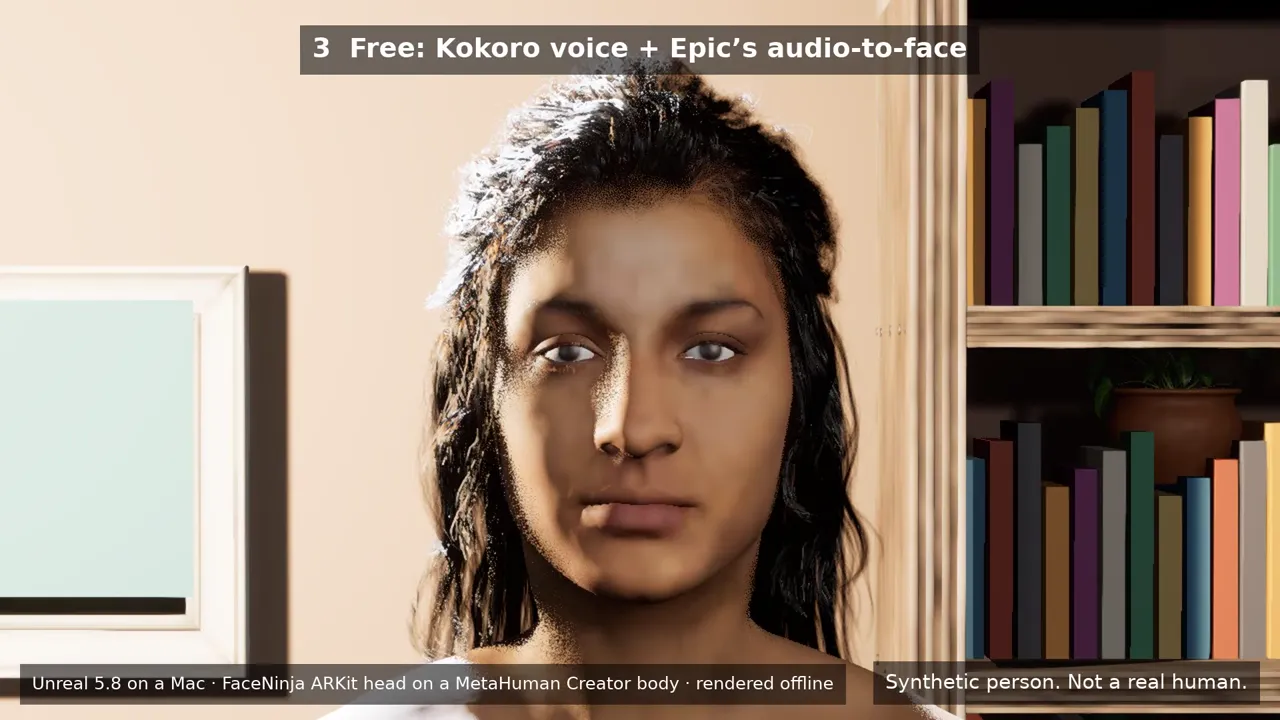
अपने FaceNinja हेड को Unreal Engine 5.8 के एक छोटे स्टेज पर ऐसे MetaHuman में बदलें जो आपके साथ बोलता और हिलता है। आपका कोडिंग एजेंट इसे सात प्रॉम्प्ट से बनाता है। आप टाइप करते हैं, वह बोलता है; आप मुस्कुराते हैं, वह मुस्कुराता है। फिर आप उसे OBS में कैप्चर करते हैं।
वर्शन 0.3.1 · 6.6 MB · MIT लाइसेंस · Windows और Mac
स्क्रिप्ट और एजेंट के लिए साइज़ और SHA-256: version.json
किट
वर्शन
0.3.1
डाउनलोड
6.6 MB · zip
लाइसेंस
MIT, कमाई वाले चैनलों के लिए भी मुफ़्त
ज़रूरत
Unreal Engine 5.8 (मुफ़्त), एक FaceNinja हेड और MCP इस्तेमाल कर सकने वाला कोडिंग एजेंट
चलता है
Windows 10 या 11, macOS 14 या नया
एक फ़ोटो, फिर बोलने वाला हेड।
एक AI से बनी फ़ोटो, फिर उससे बना FaceNinja हेड, फिर वही हेड किट के कमरे में बोलता हुआ, Unreal 5.8 में रेंडर किया गया। पहली लाइन: मुफ़्त Kokoro आवाज़ और Epic का मुफ़्त ऑडियो से लिप सिंक। दूसरी लाइन: ElevenLabs की आवाज़ और सशुल्क Runtime MetaHuman Lip Sync प्लगइन। बोलता हुआ हेड FaceNinja का ARKit हेड (52 blendshape) है, MetaHuman Creator की बॉडी और बालों पर, ऑफ़लाइन रेंडर किया हुआ।
इस वीडियो में हर व्यक्ति सिंथेटिक है। अपना चेहरा और अपनी आवाज़ इस्तेमाल करें, या कोई ओरिजिनल किरदार।
FaceNinja में अपनी फ़ोटो से हेड बनाएँ और MetaHuman ZIP डाउनलोड करें।
आपका एजेंट स्टेज बनाता है
किट को अनज़िप करें, उसी फ़ोल्डर में अपना कोडिंग एजेंट खोलें और एक-एक करके सात प्रॉम्प्ट पेस्ट करें। एजेंट Unreal को Unreal के अपने MCP सर्वर और किट के टूल से चलाता है।
आप स्ट्रीम करते हैं
आपका iPhone या वेबकैम चेहरे को हिलाता है। एक लाइन टाइप करें और आपका अवतार उसे बोल देता है। OBS विंडो को कैप्चर करता है।
कोई कोड नहीं लिखना। हर प्रॉम्प्ट का अंत किसी ऐसी चीज़ पर होता है जिसे आप जाँच सकें।
छोटा डाउनलोड, सब कुछ जुड़ा हुआ।
स्ट्रीमिंग रूम
एक गर्म-सा छोटा कमरा जिसमें सोफ़ा, किताबों की अलमारी, एक पौधा और नरम लाइटें हैं, तीन कैमरे (क्लोज़-अप, बस्ट, वाइड) और एक ग्रीन स्क्रीन जिसे आप चालू कर सकते हैं।
आपका MetaHuman
एक टूल आपकी MetaHuman ZIP इंपोर्ट करता है, MetaHuman Creator के चेहरे को उस पर ठीक-ठीक फ़िट करता है और सबसे मिलते-जुलते बाल, भौंहें और पलकें चुनता है।
फ़ेस ट्रैकिंग
iPhone पर Live Link Face, या Epic की वेबकैम फ़ेस ट्रैकिंग।
टाइप करके बोलें
आपके कंप्यूटर पर एक छोटा पैनल और एक वॉइस सर्वर। मुफ़्त Kokoro आवाज़ हाल के ग्राफ़िक्स कार्ड पर लगभग 0.1 s में बोलना शुरू कर देती है।
OBS के लिए तैयार
OBS विंडो कैप्चर के लिए 1920×1080 विंडो में चलाएँ, और अपना बैकग्राउंड चाहें तो ग्रीन स्क्रीन के साथ। Mac पर NDI और Windows पर Spout भी विकल्प हैं।
GLB और FBX हेड भी
किट आपके हेड का GLB या FBX भी उसके 52 ARKit blendshape के साथ इंपोर्ट करती है, असली साइज़ में और उस मटीरियल सेटिंग के साथ जो Unreal को उन्हें दिखाने के लिए चाहिए।
साथ में एजेंट के लिए नोट (AGENTS.md) और Claude Code, Codex, Cursor, VS Code और Gemini CLI के लिए MCP सेटिंग।
आपको क्या चाहिए।
कंप्यूटर, सॉफ़्टवेयर और अकाउंट
क्या
सुझाया गया
न्यूनतम
कंप्यूटर
NVIDIA RTX 3070 या बेहतर वाला Windows 11, या M2 Max या नए वाला Mac और 32 GB मेमोरी
RTX कार्ड और 16 GB RAM वाला PC, या M1 या नए वाला Mac और 16 GB (कम फ़्रेम रेट)
डिस्क
150 GB खाली
100 GB खाली
सॉफ़्टवेयर
Unreal Engine 5.8, OBS, एक वर्चुअल ऑडियो केबल (VB-CABLE या BlackHole) और एक कोडिंग एजेंट। प्रॉम्प्ट 1 इन्हें आपके साथ जाँचता और इंस्टॉल करता है।
अकाउंट
FaceNinja, और MetaHuman Creator के रिग के लिए एक मुफ़्त Epic Games अकाउंट
वैकल्पिक
iPhone 12 या नया, मुफ़्त Live Link Face ऐप के साथ
एक वेबकैम
डिफ़ॉल्ट रूप से मुफ़्त।
मुफ़्त
किट (MIT लाइसेंस)
Unreal Engine 5.8, MetaHuman Creator और Live Link Face
ElevenLabs की आवाज़ें, आपके अपने ElevenLabs अकाउंट पर और ElevenLabs द्वारा प्रति अक्षर बिल की जाती हैं
Fab पर Runtime MetaHuman Lip Sync प्लगइन: $1,00,000 सालाना से कम वाले क्रिएटर के लिए प्रति सीट लगभग $280, उससे ऊपर $840
Unreal स्ट्रीम किए गए या रिकॉर्ड किए गए वीडियो पर कोई रॉयल्टी नहीं लेता। दूसरी कंपनियों के प्रोडक्ट की कीमतें अक्टूबर 2026 की हैं; उनकी साइट देख लें।
कॉपी करें, पेस्ट करें, जाँचें।
इन्हें क्रम से, एक-एक करके पेस्ट करें और तब तक रुकें जब तक आपका एजेंट पूरा न कर ले। हर एक के अंत में लिखा है कि आपको क्या दिखना चाहिए।
प्रॉम्प्ट हर भाषा संस्करण में अंग्रेज़ी में ही रहते हैं, क्योंकि आपके एजेंट को टूल और फ़ाइल के नाम ठीक वैसे ही चाहिए। आप अपने एजेंट से अपनी भाषा में बात कर सकते हैं।
01 · ज़रूरी चीज़ें इंस्टॉल करें
समय: 20–90 मिनट, ज़्यादातर डाउनलोड
प्रॉम्प्ट · English
I am setting up the FaceNinja Creator Kit in this folder. I do not write code, so explain each step in one short
sentence and ask me before anything that needs my password, installs a driver, or changes system settings.

1. Tell me my operating system, CPU, RAM, graphics card and free disk space, and compare them with the
   "What you need" table in GUIDE.md. Warn me if something is below the minimum.
2. Check what is installed and tell me what is missing:
   - Unreal Engine 5.8 (Windows: C:\Program Files\Epic Games\UE_5.8; Mac: /Users/Shared/Epic Games/UE_5.8).
     If it is missing, do not install it yourself: tell me to install Unreal Engine 5.8 from the Epic Games
     Launcher's Library tab (default options), and wait until I say it is done.
   - OBS Studio. Offer to install it (Windows: winget install OBSProject.OBSStudio; Mac: brew install --cask obs).
   - A virtual audio cable. Windows: VB-CABLE from https://vb-audio.com/Cable/ (I run its installer as
     administrator and restart). Mac: brew install --cask blackhole-2ch (it asks for my password).
     Only from these places.
   - uv (https://docs.astral.sh/uv/getting-started/installation/).
3. In tts/, make the voice environment: uv venv -p 3.11, then uv pip install -r requirements-kokoro.txt
   (on a PC with an NVIDIA card add --extra-index-url https://download.pytorch.org/whl/cu128).
4. Run uv run python server.py --list-devices in tts/ and show me the output devices.

End with a checklist: Unreal 5.8, OBS, virtual cable, voice environment, each with a tick or a cross.
आपको यह दिखना चाहिए: चार टिक: Unreal 5.8, OBS, केबल और आवाज़।
02 · अपने एजेंट को Unreal से जोड़ें
समय: 10–20 मिनट
प्रॉम्प्ट · English
Open the kit's Unreal project and connect to Unreal's own MCP server.

1. Open FaceNinjaCreatorKit/FaceNinjaCreatorKit.uproject with Unreal Engine 5.8 (Mac: open -a with
   "/Users/Shared/Epic Games/UE_5.8/Engine/Binaries/Mac/UnrealEditor.app" and the project path; Windows:
   "C:\Program Files\Epic Games\UE_5.8\Engine\Binaries\Win64\UnrealEditor.exe" with the project path).
   Tell me the first start takes several minutes while it compiles shaders.
2. The project starts Unreal's MCP server at http://127.0.0.1:8000/mcp. This folder already has the MCP
   settings for you (.mcp.json, .cursor, .vscode, .gemini, .codex). If you cannot see an "unreal-mcp" server,
   tell me how to reload your MCP settings, or add that URL yourself.
3. Wait until the server answers, then list the toolsets. You should find FaceNinjaKitTools. Describe it and
   tell me in one sentence per tool what you can now do for me.
आपको यह दिखना चाहिए: आपका एजेंट FaceNinja के टूल की सूची देता है।
03 · अपना स्टेज बनाएँ
समय: 2–5 मिनट
प्रॉम्प्ट · English
Using FaceNinjaKitTools in Unreal, build my streaming stage.

1. Call build_stage. It makes a small room with a sofa, a bookshelf, a plant, lights and three cameras.
2. Take a still from each camera with stage_screenshot (closeup, bust, wide) and show them to me.
3. Ask me which camera I want for streaming and call set_camera with it.
आपको यह दिखना चाहिए: कमरे की तीन स्टिल इमेज।
04 · अपना FaceNinja हेड लाएँ
समय: 15–30 मिनट
प्रॉम्प्ट · English
Using FaceNinjaKitTools in Unreal, turn my FaceNinja head into a MetaHuman and put it on my stage.
My head ZIP is: <drag the ZIP file here>

1. Call import_head_zip with that path. Tell me which hair, brows and lashes it picked.
2. Tell me that the next step sends my head's shape (not my photos) to Epic's free MetaHuman service, and that
   a browser window may ask me to sign in to my Epic account. Wait for my OK.
3. Call preview_avatar so I can see my head in the room, and show me a stage_screenshot (bust camera).
4. Call rig_head, then download_head_textures. Tell me: "A browser opens Epic's sign-in page. Unreal stops
   answering until you sign in and approve it there; that is normal." Wait until I say I approved it, then
   check head_status every 30 seconds until rigged and high_res_textures are both true.
5. Once rigged: call build_metahuman, then place_avatar.
6. Take a stage_screenshot with the bust camera and show it to me.
आपको यह दिखना चाहिए: कमरे में आपका MetaHuman।
05 · अपना iPhone या वेबकैम जोड़ें
समय: 10 मिनट
प्रॉम्प्ट · English
Using FaceNinjaKitTools in Unreal, connect my iPhone's Live Link Face app to my avatar.

1. Call my_ip_address. Tell me where to type it in the app (Settings > Live Link > Add Target, port 14785).
2. Ask me for the phone's IP address (Live Link Face shows it in its settings), then call connect_iphone.
3. Call connect_face with FN_iPhone, then play_in_window.
4. Ask me to smile, blink and turn my head, and whether the avatar follows. Ask before changing any firewall
   setting.
आपको यह दिखना चाहिए: अवतार आपके चेहरे की नकल करता है।
06 · टाइप करके बोलें
समय: 10 मिनट
प्रॉम्प्ट · English
Start the kit's voice server and connect it to my avatar.

1. Ask me which voice I want:
   a. a free preset voice that runs on my computer (Kokoro, default),
   b. my own voice (Chatterbox): ask me to record 10-20 seconds of myself reading any text in a quiet room as
      tts/my_voice.wav, then set it up with requirements-chatterbox.txt,
   c. a studio voice from ElevenLabs: it needs my own ElevenLabs account, costs money per line and sends my text to ElevenLabs.
      Ask me to put my own ElevenLabs API key in the ELEVENLABS_API_KEY environment variable myself; never write it to a file.
2. In tts/ start the server in the background with my cable as --device ("BlackHole" on a Mac, "CABLE Input" on
   Windows):
   a. uv run python server.py --engine kokoro --preset af_heart --device "<cable>"
   b. uv run python server.py --engine chatterbox-turbo --voice my_voice.wav --device "<cable>"
   c. uv run python server.py --engine elevenlabs --voice Rachel --device "<cable>"
3. In Unreal, using FaceNinjaKitTools: voice_status, then connect_voice (it listens on the cable), then
   connect_face with FN_Voice, then play_in_window, then open_talk_panel.
4. Call say with "Hi everyone, welcome back to the stream!" and ask me if the lips moved with the voice.
आपको यह दिखना चाहिए: वह आपकी लाइन बोलता है, होंठ हिलते हुए।
07 · OBS के साथ लाइव जाएँ
समय: 10 मिनट
प्रॉम्प्ट · English
Help me show my avatar in OBS Studio.

1. In Unreal, using FaceNinjaKitTools: play_in_window (1920x1080). If I want my own background instead of the
   room, call set_green_screen with true first.
2. In OBS add a "Window Capture" (Windows) or "macOS Screen Capture" set to that Unreal window. Tell me the
   clicks; you cannot click in OBS for me.
3. Only with the green screen: add a "Chroma Key" filter (key colour green) and show me where "Similarity" is.
4. Add an "Audio Input Capture" of "CABLE Output" (Windows) or "BlackHole 2ch" (Mac), and set its
   "Audio Monitoring" to "Monitor and Output" so I hear the voice too.
आपको यह दिखना चाहिए: OBS में आपका अवतार, अपनी आवाज़ के साथ।
हर चरण, और कुछ न चलने पर क्या करना है, ज़िप में GUIDE.md में है।
तीन तरह की आवाज़।
टाइप करके बोलने के लिए आवाज़ें
आवाज़
कहाँ चलती है
पहली आवाज़
खर्च
नोट
Kokoro (डिफ़ॉल्ट)
आपका कंप्यूटर
RTX 5080 पर लगभग 0.08 s, M5 Max Mac पर 0.09 s
मुफ़्त (Apache-2.0)
8 भाषाओं में 54 प्रीसेट आवाज़ें
आपकी अपनी आवाज़ (Chatterbox)
आपका कंप्यूटर
RTX 5080 या M5 Max Mac पर लगभग 0.7–1.1 s
मुफ़्त (MIT)
आपकी अपनी 10–20 सेकंड की रिकॉर्डिंग से। हर क्लिप में एक सुनाई न देने वाला वॉटरमार्क होता है जो उसे सिंथेटिक के रूप में चिह्नित करता है।
क्लाउड आवाज़ (ElevenLabs)
क्लाउड
आपके कनेक्शन पर निर्भर; हमने नापा नहीं है
आपके प्लान पर ElevenLabs द्वारा प्रति अक्षर बिल
आपकी टाइप की गई लाइनें ElevenLabs को जाती हैं। आप अपना ElevenLabs अकाउंट और API key खुद लाते हैं।
पहली आवाज़: लाइन भेजने से पहली ऑडियो तक का समय, अक्टूबर 2026 में किट के वॉइस सर्वर के ज़रिए नापा गया।
आपका चेहरा, आपकी आवाज़।
अपना चेहरा और अपनी आवाज़ इस्तेमाल करें, कोई ओरिजिनल किरदार, या ऐसा व्यक्ति जिसने लिखित में सहमति दी हो। किसी सेलिब्रिटी, स्ट्रीमर या किसी और जैसा दिखने वाला चेहरा न बनाएँ, और किसी और की आवाज़ क्लोन न करें। यह किसी और का रूप धरना (impersonation) है: यह कानून तोड़ सकता है (पर्सनैलिटी और पब्लिसिटी राइट्स), और YouTube, Twitch और Epic के नियम भी तोड़ता है।
किट के बारे में सवाल।
01क्या मुझे कोड लिखना पड़ेगा?
नहीं। आप प्रॉम्प्ट पेस्ट करते हैं; आपका एजेंट टूल चलाता है और नतीजे की तस्वीरें दिखाता है।
02क्या यह Mac पर चलता है?
हाँ, M1 या नए Mac और Unreal 5.8 पर। Epic के रियल-टाइम फ़ेस टूल Unreal 5.8 से Mac पर चलते हैं।
03मेरे कंप्यूटर से बाहर क्या जाता है?
जब MetaHuman Creator रिग बनाता है, तब आपके हेड का आकार Epic को जाता है। अगर आप क्लाउड आवाज़ चुनते हैं, तो आपकी टाइप की गई लाइनें ElevenLabs को जाती हैं। इसके अलावा कुछ नहीं: न फ़ोटो, न रिकॉर्डिंग।
04क्या इससे बने वीडियो बेचे जा सकते हैं?
हाँ। किट MIT है, Unreal वीडियो पर रॉयल्टी नहीं लेता, और Kokoro और Chatterbox व्यावसायिक इस्तेमाल की इजाज़त देते हैं। उनके हिस्सों के लिए ElevenLabs और Fab की शर्तें देख लें।
05क्या सशुल्क लिप-सिंक प्लगइन शामिल है?
नहीं। यह Fab पर प्रति सीट बिकता है। मुफ़्त रास्ता Epic का अपना ऑडियो से लिप सिंक इस्तेमाल करता है।
06क्या अवतार को ऐप के रूप में शेयर किया जा सकता है?
मुफ़्त लिप सिंक के साथ नहीं: Epic का ऑडियो सोर्स एडिटर (Play) में काम करता है, और VTuber स्ट्रीम इसी तरह चलती है। पैकेज्ड ऐप के लिए सशुल्क प्लगइन चाहिए।
07मेरे पास सिर्फ़ GLB या FBX है। क्या यह चलेगा?
हाँ, स्टिल और एनिमेशन के लिए। फ़ाइलें मीटर में हैं, इसलिए हेड असली साइज़ में आता है, और किट अपने मटीरियल पर Used with Morph Targets चालू कर देती है ताकि blendshape काले न दिखें। लाइव चेहरा और आवाज़ MetaHuman को चलाते हैं, इसलिए स्ट्रीमिंग के लिए MetaHuman ZIP इस्तेमाल करें। ज़्यादा जानकारी Unreal नोट्सEN में।
लाइसेंस।
किट MIT है (ज़िप में LICENSE)। कमरे की आर्ट Poly Haven की CC0 है। बाक़ी सब कुछ (Unreal, MetaHuman, OBS, केबल, आवाज़ें, वैकल्पिक प्लगइन) आप खुद इंस्टॉल करते हैं, उनके अपने लाइसेंस के तहत; ज़िप में THIRD_PARTY.md हर एक को उसके लिंक के साथ सूचीबद्ध करती है।